
Age of Empires Mobile
Level InfiniteStrategy
4.210.06K Reviews
- Version
- 1.13.101.0
- Installs
- 10.00M
- Age Rating
- Teen
Screenshots


Our Review of Age of Empires Mobile
 Analysis by Appyee
When I first heard about Age of Empires Mobile, I was immediately intrigued. As a fan of the classic PC versions, the idea of taking this beloved real-time strategy game on the go was simply too good to pass up. So, I downloaded the app and dove right in to explore what it had to offer.
My first practical question was whether this would suit a quick break or demand the kind of uninterrupted attention I usually give a computer strategy game. I found that it can fit into a mobile routine, but it helps to decide what you want from a session before opening it: a little progress and planning, or a focused stretch spent reacting to events. The difference matters because a phone is convenient, yet its small screen and interruptions make long, complicated battles less comfortable than they are on a PC.
The game is free to download, and its Teen rating is worth keeping in mind if younger players share your device. Level Infinite develops it, and the current version is 1.10.101.0. It was released on Oct 15, 2024, and it runs on Android 5.0 or later. Those details make it easy to check basic compatibility, though I would still leave room on a device for the game and its ongoing updates rather than treating the minimum operating-system requirement as a guarantee of equally smooth performance on every phone.
Who will enjoy this mobile take
I think it is most appealing to people who like building an economy while keeping an eye on military pressure, and to series fans curious about how familiar ideas work on a touchscreen. It also makes sense for someone who wants strategy within reach instead of having to sit down at a computer. The app has more than 10 million installs, a 4.1 average from around 397,000 ratings, and roughly 8,900 written reviews. That broad audience suggests it has attracted plenty of players, but popularity alone cannot tell you whether its particular pace or mobile presentation will suit you.
I would be more cautious if you want the exact feel of a traditional PC match, or if you dislike games that combine free access with optional purchases. The in-app purchase range runs from $0.99 to $99.99 per item, so it is sensible to check purchase settings before handing over a device. I would also suggest trying the game without spending first: that gives you a better sense of whether its routine and strategic choices are enjoyable on their own, rather than letting a purchase mask a mismatch.
First Impressions and Setup
Getting started with Age of Empires Mobile was surprisingly smooth. The download was quick, and the initial setup didn’t require much more than a few taps. As soon as I launched the game, I was greeted by a beautifully designed interface that felt both familiar and fresh. The developers have done an impressive job of adapting the classic visuals for mobile screens without losing any of that nostalgic charm.
The tutorial is concise but comprehensive, walking you through the basics of building your empire, managing resources, and commanding your armies. It’s perfect for both newcomers and seasoned players needing a quick refresher. I appreciated the intuitive touch controls, which made it easy to navigate through the menus and execute commands.
For a first session, I recommend treating the tutorial as a chance to learn the interface, not as proof that every later decision will be equally straightforward. On a touchscreen, the useful habit is to pause briefly before committing resources or sending units: check which panel is active, what you are prioritizing, and whether the order you tapped actually matches your intention. That small bit of care can save frustration when menus and battlefield action compete for attention.
Gameplay Mechanics
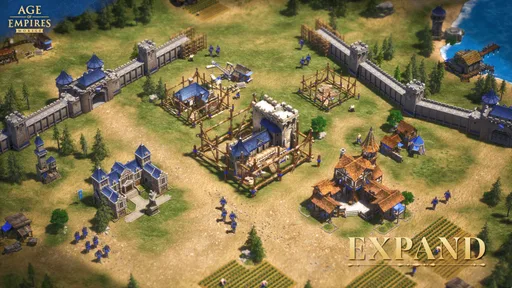
The core gameplay of Age of Empires Mobile stays true to its roots, offering a rich and engaging strategy experience. You start with a small settlement and work your way up to building a sprawling empire. The game includes several civilizations, each with unique units and special abilities, which adds a nice layer of depth and replayability.
Managing resources like wood, food, gold, and stone is as crucial as ever. I found myself constantly balancing my economy, military, and technological advancements to ensure my empire thrived. The AI opponents are quite challenging, requiring me to adapt my strategies constantly. I loved the real-time element, which kept me on my toes, especially during intense battles.
A useful way to make those choices less reactive is to give each session a simple priority. If I am behind economically, I focus on stabilizing resource production before chasing every possible military improvement; if pressure is building, I reassess whether expansion is worth the risk. This is not a magic strategy that wins every encounter, but it keeps the decision-making legible and helps prevent the common mobile-game impulse to tap through several prompts without understanding their cost.
That focus also helps when playing in short intervals. Rather than trying to manage every aspect at once, I would use a brief visit to check the state of the settlement, identify one pressing need, and make a deliberate adjustment. When I have more time, I can pay closer attention to battles and the consequences of earlier choices. The trade-off is that a stop-start routine may make it harder to follow a complex contest, so this is not the best fit for someone who wants every match to demand uninterrupted concentration.
Graphics and Sound
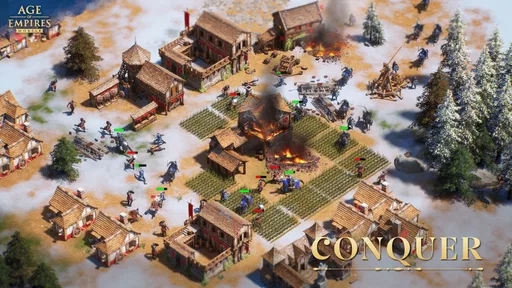
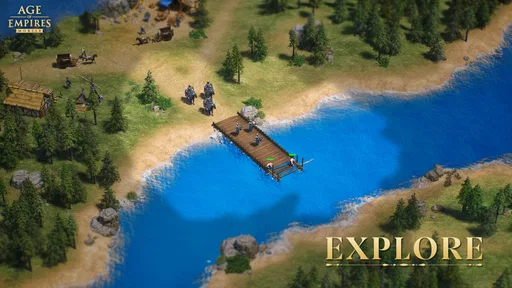
I was pleasantly surprised by the graphics quality. The developers have successfully translated the classic 2D visuals into a vibrant mobile format. The attention to detail in the unit animations and landscapes is noticeable, and it’s easy to get lost in the immersive world they’ve created. The sound design is equally impressive, with epic background scores and sound effects that enhance the overall gaming experience.
On a phone, presentation is not only about scenery; readability is part of the strategy. I found it helpful to take a moment to distinguish the important parts of the interface before a tense encounter, rather than relying on quick glances once several things need attention. If you mostly play in noisy places, sound effects and music may be less useful than the visual cues, while at home I prefer audio because it adds atmosphere. Either way, the game is easier to enjoy when the screen is large enough for you to read comfortably.
Multiplayer and Community
One of the highlights of Age of Empires Mobile is the multiplayer mode. Competing against other players from around the world adds an exciting dimension to the game. The matchmaking is generally quick, and I appreciated the fair competitive environment. The community aspect is thriving, with forums and in-game chat features that allow players to share strategies and form alliances.
There’s also a ranked system that adds a layer of motivation to improve and climb the leaderboards. It’s satisfying to see your progress reflected in your ranking and to strategize against other human players who often think outside the box.
For a newcomer, I would treat multiplayer as a place to learn patterns, not just as a test of whether you are already good. After a match, think about one decision that made a difference—perhaps a resource choice, a timing mistake, or a response to an opponent—rather than trying to change your whole approach at once. Chat and alliances can add a social reason to return, but players who prefer a completely solitary experience may find that community features are not a major draw.
Compared with a more traditional single-player strategy game, the human competition here can feel less predictable and more social, but it also brings a different kind of pressure: other players may not wait for you to take your time. If you want carefully paced solo scenarios above all else, a campaign-focused alternative may be a better match. If the appeal is testing your decisions against people who adapt, the competitive side is the stronger reason to stay.
In-App Purchases and Monetization
While the game is free to download, Age of Empires Mobile does include in-app purchases. These range from cosmetic enhancements to boosts that can speed up building times or resource gathering. Thankfully, I didn’t find these purchases necessary to enjoy the game fully. The developers have balanced the monetization in such a way that it doesn’t feel intrusive or pay-to-win, which is always a concern with mobile games.
The option to earn premium currency through gameplay is also a nice touch, rewarding players who invest time and effort into their empires.
My practical advice is to separate convenience from value. A boost may sound attractive when you are waiting for progress, but first ask whether you actually want to play more often or simply want to skip a pause. If it is the pause you dislike, spending can become a habit without making the underlying strategy more interesting. I would set a personal limit before browsing the purchase options, especially on a shared device, and judge any purchase by whether it improves the experience for you rather than by how quickly it moves a progress bar.
How it fits among strategy games
Mobile strategy games often lean either toward compact, self-contained tactical challenges or toward longer-term empire management. This one appeals to me because it puts settlement growth, resource decisions, and military play under the familiar Age of Empires identity, while also making multiplayer a substantial part of the experience. That blend is a reason to try it if you want both planning and competition, but it may not replace a PC strategy game for someone who wants the same scale, input precision, and uninterrupted match format.
It is also not my first recommendation for a player who only wants a fast puzzle-like strategy round with a clear beginning and end. The appeal here is developing an empire and adjusting a broader plan, so the satisfaction comes from decisions accumulating rather than from solving one isolated board. Conversely, if you enjoy watching a settlement take shape and learning how different choices affect your position, the slower management side can make even a short check-in feel purposeful.
A realistic routine might be to open the game during a quiet break, review what needs attention, make one or two considered choices, and return later when you have enough time to concentrate on a battle or a multiplayer session. I would avoid starting a competitive match when I know I will have to put my phone away at any moment. That is a simple distinction, but it helps the game fit everyday life without turning every spare minute into an obligation.
What to expect as the game evolves
The release date and current version give players a useful reference point: this is a mobile strategy title that launched on Oct 15, 2024, and is currently at version 1.10.101.0. I can say where it stands from those facts, but I would not treat a version number as proof of a particular new feature or balance change. For someone returning after a break, the sensible approach is to check the in-game notices and review what has changed before committing to a familiar plan; even a small adjustment can affect how comfortable an old routine feels.
For existing players, the key question is less whether a higher version number sounds impressive and more whether the game continues to reward the parts they enjoy: building, making tactical choices, and finding worthwhile competition. I would keep an eye on clarity around updates, balance, and purchase options, because those are the areas most likely to shape a long-term mobile strategy experience. New players can use the same approach in reverse: learn the current basics first, then decide which activities are worth making part of a regular routine.
Final Thoughts
Overall, Age of Empires Mobile is a fantastic adaptation of the classic strategy series for mobile devices. It offers a rich, engaging experience that stays true to its roots while introducing new features to appeal to modern gamers. The combination of strategic depth, beautiful graphics, and a vibrant community makes it a must-try for fans of the genre.
If you’re looking for a mobile game that challenges your strategic thinking and provides endless hours of entertainment, Age of Empires Mobile is definitely worth downloading. Whether you’re a long-time fan or a newcomer, it’s a game that promises to keep you engaged and entertained.
Verdict
Strengths of Age of Empires Mobile
- Impressive graphics for a mobile game.
- Intuitive touch controls enhance playability.
- Rich historical details and accuracy.
- Varied civilizations with unique abilities.
- Regular updates and new content.
Limitations of Age of Empires Mobile
- In-app purchases can be pricey.
- Requires a stable internet connection.
- Battery consumption is quite high.
- Limited offline functionality.
- May lag on older devices.
Other Releases by Level Infinite
View All
PUBG MOBILE
Action4.3

Arena Breakout: Realistic FPS
Action4.3

Honor of Kings
Action4.2

NBA Infinite - PvP Basketball
Sports3.8
Similar Picks in This Category
View All
Clash of Clans
Supercell4.5

Plants vs. Zombies™
ELECTRONIC ARTS3.7

Lords Mobile: Kingdom Wars
IGG.COM4.5

Clash Royale
Supercell4.4

State.io — Conquer the World
CASUAL AZUR GAMES4.1

Car Driving School : Car Games
Spark Game Studios3.9
Frequently Asked Questions
What is Age of Empires Mobile?
Age of Empires Mobile is a strategy-based game designed specifically for mobile devices. It retains the core elements of the classic Age of Empires series, allowing players to build empires, manage resources, and engage in real-time battles. With intuitive controls and mobile-optimized graphics, it aims to deliver a rich and immersive experience on-the-go.
Is Age of Empires Mobile free to play?
Yes, Age of Empires Mobile is free to download and play. However, it includes optional in-app purchases that can enhance the gameplay experience. These purchases might include special items, resources, or expansions that can accelerate progress or unlock exclusive content. Players can still enjoy the full game without making any purchases.
What are the system requirements for Age of Empires Mobile?
Age of Empires Mobile is designed to run on most modern Android and iOS devices. It requires at least iOS 11 or Android 7.0, with a minimum of 2GB RAM for optimal performance. For the best experience, ensure your device has sufficient storage space and the latest software updates installed to handle the game’s graphics and processing demands.
Can I play Age of Empires Mobile offline?
Age of Empires Mobile primarily requires an internet connection to play, especially for multiplayer features and real-time updates. Some single-player campaigns or missions might be available offline, but to fully enjoy the game’s features and community interactions, maintaining a stable internet connection is recommended.
Are there multiplayer options available in Age of Empires Mobile?
Yes, Age of Empires Mobile includes robust multiplayer options. Players can engage in real-time battles with friends or compete against other players worldwide. The game features various modes for cooperative and competitive play, allowing users to form alliances or challenge each other to climb the leaderboards, enhancing the social and strategic aspects of gameplay.
Play our best games!


